The Importance of Ergonomics in the Workplace: Tips for a Healthy Workforce
MSDs account for 30% of all worker injuries and cost employers up to $54 billion annually. Learn how to build an ergonomic program that reduces injury rates, cuts workers comp costs by 60%, and boosts productivity — with ROI data, assessment frameworks, and industry-specific strategies.
Introduction
Musculoskeletal disorders (MSDs) are the single largest category of workplace injuries in the United States — and they are almost entirely preventable. According to the Bureau of Labor Statistics, MSDs account for roughly 30% of all worker injury and illness cases requiring days away from work. That translates to hundreds of thousands of lost workdays every year and a staggering financial burden on employers.
The numbers are hard to ignore. OSHA estimates that MSDs cost employers $20 billion per year in direct workers' compensation costs alone. When you factor in indirect costs — lost productivity, temporary staffing, retraining, and administrative overhead — the total climbs to $45–54 billion annually. The Liberty Mutual Workplace Safety Index consistently ranks overexertion injuries (lifting, pushing, pulling, carrying) as the leading cause of disabling workplace injuries, costing billions per year. And the National Council on Compensation Insurance (NCCI) data suggests that average workers' comp claims for MSDs typically exceed $30,000 — roughly double the average for other workplace injuries.
The Hidden Cost of Inaction
For every $1 in direct MSD workers' compensation costs, employers pay an estimated $2.70 in indirect costs — including overtime, hiring temps, administrative time, and reduced morale across the team. A single back injury claim averaging $30,000+ in direct costs can actually cost your organization over $125,000 when all factors are included.
If you are an HR or EHS professional, ergonomics is not a "nice to have" — it is one of the highest-ROI investments you can make in your workforce. This article gives you the data, frameworks, and practical strategies to build an ergonomic program that reduces injuries, cuts costs, and creates a culture where employees can do their best work.
The Business Case: MSD Costs by Industry
Not all industries face the same ergonomic risks. The following table breaks down the most common MSD types, the industries hit hardest, and the average cost per claim based on NCCI and BLS data:
| MSD Type | Primary Industries Affected | Avg. Cost per Claim | Median Days Away from Work |
|---|---|---|---|
| Low back disorders | Warehousing, Construction, Healthcare | $40,000–$65,000 | 12 days |
| Carpal tunnel syndrome | Manufacturing, Office/Admin, Food Processing | $30,000–$50,000 | 28 days |
| Rotator cuff injuries | Construction, Manufacturing, Healthcare | $45,000–$80,000 | 22 days |
| Tendinitis (wrist/elbow) | Office/Admin, Manufacturing, Retail | $15,000–$25,000 | 10 days |
| Neck/cervical strain | Office/Admin, Transportation, Healthcare | $20,000–$35,000 | 8 days |
| Knee disorders | Construction, Warehousing, Manufacturing | $35,000–$60,000 | 15 days |
These are not abstract figures. Behind every one of those averages is a real employee who missed weeks of work — and a real HR team managing the fallout.
Understanding Ergonomics: Beyond Chair Adjustments
Ergonomics is the science of designing work to fit the worker — not forcing the worker to adapt to the work. While most people associate ergonomics with office chairs and monitor height, a comprehensive ergonomic program addresses three interconnected domains:
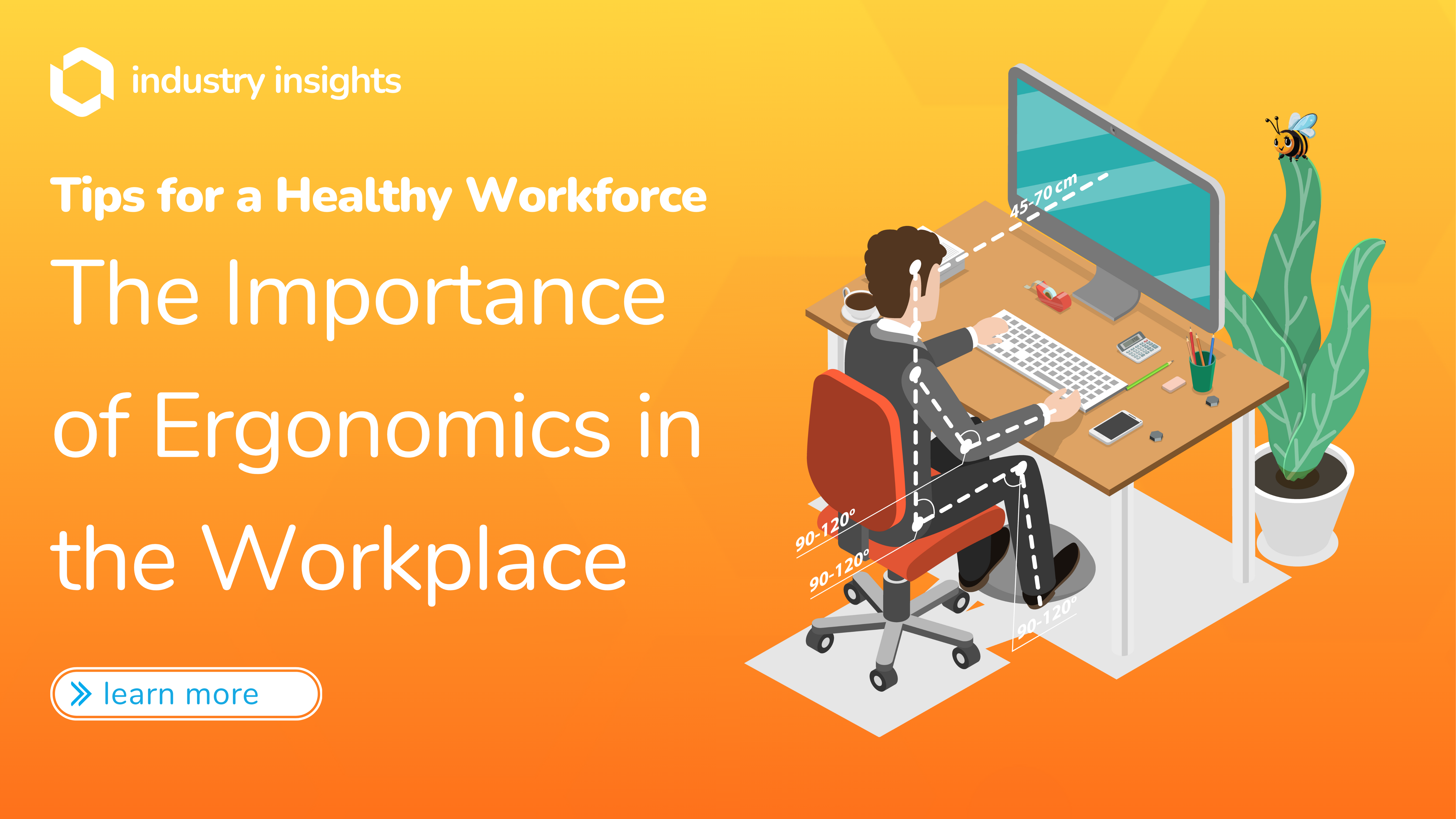
Physical ergonomics focuses on the body's interaction with tools, workstations, and physical tasks. This includes posture, repetitive motion, manual material handling, and workstation layout.
Cognitive ergonomics addresses mental workload, decision-making, and human-computer interaction. Poor cognitive ergonomics leads to errors, stress, and fatigue — particularly in safety-critical roles.
Organizational ergonomics covers work schedules, shift design, team structures, and workflows. Even a perfectly designed workstation will not prevent injuries if employees work 12-hour shifts with no rotation or recovery breaks.
The Hierarchy of Ergonomic Controls
OSHA recommends a hierarchy of controls for ergonomic hazards, ranked from most to least effective: 1) Elimination — remove the hazard entirely (automate the task). 2) Substitution — replace with a less hazardous process. 3) Engineering controls — redesign workstations, tools, or equipment. 4) Administrative controls — change work practices, rotation schedules, or break policies. 5) PPE/Training — educate workers on proper technique. Always start at the top of the hierarchy before relying on training alone.
OSHA Ergonomic Risk Factors
OSHA identifies specific risk factors that contribute to MSD development. Understanding these is the foundation of any assessment:
| Risk Factor | Description | Common Examples |
|---|---|---|
| Repetition | Performing the same motion repeatedly | Data entry, assembly line tasks, packaging |
| Force | Exerting excessive physical effort | Lifting heavy patients, pushing loaded carts |
| Awkward postures | Working in positions that strain joints | Overhead reaching, prolonged sitting, twisting |
| Static postures | Holding a fixed position for extended time | Standing at a register, sitting without breaks |
| Contact stress | Body pressing against hard or sharp surfaces | Wrists resting on desk edge, kneeling on hard floors |
| Vibration | Using vibrating tools or equipment | Jackhammers, power tools, driving heavy vehicles |
| Cold temperatures | Working in cold environments | Refrigerated warehouses, outdoor construction |
When multiple risk factors are present simultaneously — for example, repetitive motion combined with awkward posture and force — the likelihood of injury increases exponentially. Your ergonomic assessment must evaluate these factors in combination, not isolation.
Industry-Specific Ergonomic Challenges
Office and Administrative Work
The shift to knowledge work has not eliminated ergonomic risk — it has changed its shape. Prolonged sitting is now recognized as an independent risk factor for cardiovascular disease, metabolic disorders, and chronic back pain. Office workers commonly develop:
- Computer vision syndrome from screen glare, poor monitor positioning, and insufficient break time
- Carpal tunnel syndrome from repetitive keyboard and mouse use without neutral wrist positioning
- Cervical strain from forward head posture ("tech neck") caused by monitors set too low
Key interventions: adjustable sit-stand desks, external monitors at eye level, ergonomic keyboards/mice, the 20-20-20 rule for eye strain (every 20 minutes, look at something 20 feet away for 20 seconds).
Manufacturing and Assembly
Manufacturing consistently reports the highest MSD incidence rates across all industries. The combination of repetitive motion, force, and awkward postures in assembly work creates a perfect storm. Common issues include:
- Cumulative trauma disorders from repetitive assembly tasks
- Low back injuries from manual material handling
- Upper extremity disorders from overhead work and forceful gripping
Key interventions: adjustable-height workbenches, lift-assist devices, tool counterbalances, job rotation schedules, anti-fatigue matting.
Healthcare
Healthcare workers face a unique double burden: they must care for patients while protecting themselves from injury. Nursing ranks among the top occupations for MSD-related lost workdays, largely driven by patient handling. The BLS reports that nursing assistants, orderlies, and attendants have among the highest MSD incidence rates across all occupations — several times the all-industry average.
Key interventions: mechanical patient lifts, slide sheets, no-lift policies, proper body mechanics training, adequate staffing ratios to prevent rushing.
Warehousing and Logistics
With the explosion of e-commerce, warehouse workers face relentless physical demands. Amazon has reported tens of thousands of injuries across its U.S. warehouses in recent years, drawing significant regulatory and media scrutiny. The primary risk factors are:
- High-frequency lifting — picking and packing hundreds of items per shift
- Overhead reaching and deep bending into bins and containers
- Prolonged standing on concrete floors
Key interventions: conveyor systems, adjustable shelving, exoskeletons for heavy lifting, mandatory micro-break schedules, anti-fatigue flooring.
Construction
Construction ergonomics is uniquely challenging because the "workstation" changes constantly. Workers must adapt to uneven terrain, confined spaces, and elevation changes daily. The most common MSD risks include:
- Overhead work (electrical, drywall, painting) causing shoulder injuries
- Kneeling and squatting for flooring, plumbing, and low-level tasks
- Hand-arm vibration syndrome from sustained power tool use
Key interventions: tool selection for vibration reduction, knee pads and kneeling creepers, scaffolding at optimal heights, powered equipment for material handling.
Remote Work Ergonomics
The rise of remote and hybrid work has created an ergonomic blind spot for many organizations. Employees who had properly set up workstations at the office are now working from kitchen tables, couches, and makeshift desks — often for 8+ hours per day.
Remote Work Ergonomic Reality Check
Research suggests that fewer than one in four remote workers have a dedicated, ergonomically appropriate home workspace. The remaining 76% work from suboptimal setups that significantly increase MSD risk. If your company has remote or hybrid workers, your ergonomic program must extend beyond the office walls.
Practical strategies for remote work ergonomics:
- Home office stipends — Provide $500–$1,000 per employee for ergonomic equipment (chair, monitor, keyboard). This is a fraction of the cost of a single MSD claim.
- Virtual ergonomic assessments — Telehealth-based evaluations where a trained ergonomist reviews the employee's setup via video and provides personalized recommendations.
- Self-assessment checklists — Distribute simple checklists covering monitor height, chair support, lighting, and break reminders.
- Equipment lending programs — Maintain a pool of ergonomic equipment (monitors, chairs, sit-stand converters) that remote employees can borrow.
Ergonomic Assessment Framework: A Step-by-Step Guide
A structured assessment is the foundation of any effective ergonomic program. Here is a practical framework you can deploy:
Step 1: Identify High-Risk Jobs
Start with injury data. Pull your OSHA 300 logs, workers' comp claims, and absenteeism records for the past 3 years. Rank job roles by:
- Total MSD claims
- Total cost of MSD claims
- Average days away from work
- Frequency of reported discomfort
This gives you an objective, data-driven priority list — not guesswork.
Step 2: Conduct Job Hazard Analyses (JHAs)
For each high-risk job, break the role into discrete tasks and evaluate each task against OSHA's risk factors (repetition, force, awkward postures, static postures, contact stress, vibration). Tools like the NIOSH Lifting Equation, RULA (Rapid Upper Limb Assessment), and REBA (Rapid Entire Body Assessment) provide standardized scoring.
Step 3: Prioritize Interventions Using the Hierarchy of Controls
Apply interventions starting at the top of the hierarchy. Engineering controls (workstation redesign, tool upgrades) should be addressed before administrative controls (break schedules, job rotation), which should be addressed before training alone.
Step 4: Implement and Communicate
Roll out changes with clear communication. Employees need to understand why changes are being made and how to use new equipment or follow new procedures. Engagement is critical — mandating change without buy-in leads to workarounds and non-compliance.
Step 5: Measure Outcomes
Track the same metrics you used in Step 1: MSD claim frequency, claim costs, days away from work, and employee-reported discomfort. Set 6-month and 12-month review points. If metrics are not improving, reassess.
OSHA and Ergonomics: Know Your Risk
While OSHA does not have a specific ergonomics standard, the agency regularly cites employers under the General Duty Clause (Section 5(a)(1)) for ergonomic hazards that cause or are likely to cause serious injuries. General Duty Clause citations can carry penalties of up to $16,131 per violation (2024 penalty levels). Repeat or willful violations can reach $161,323 per violation. A proactive ergonomic program is your best defense.
ROI of Ergonomic Interventions
One of the most common objections to ergonomic investments is cost. The data tells a different story. Research published in the Journal of Safety Research and compiled by OSHA consistently shows that ergonomic programs deliver measurable returns:
| Intervention Type | Typical Cost per Worker | Annual Savings per Worker | ROI | Payback Period |
|---|---|---|---|---|
| Sit-stand desks | $400–$800 | $1,200–$2,500 | 200–300% | 4–8 months |
| Ergonomic chairs | $500–$1,200 | $800–$1,800 | 100–200% | 8–18 months |
| Mechanical patient lifts | $3,000–$6,000 per unit | $15,000–$40,000 per unit | 350–600% | 3–6 months |
| Lift-assist devices (warehouse) | $5,000–$15,000 per unit | $20,000–$50,000 per unit | 250–400% | 4–9 months |
| Job rotation programs | $50–$200 (training cost) | $3,000–$8,000 | 2,000–4,000% | 1–2 months |
| Virtual ergo assessments (remote) | $150–$300 | $1,500–$4,000 | 600–1,200% | 1–3 months |
The Washington State Department of Labor and Industries conducted one of the most cited studies on ergonomic program ROI, analyzing 250 case studies across multiple industries. Their findings: ergonomic interventions reduced MSD incidence by 59%, reduced lost workdays by 75%, and delivered an average ROI of $6 for every $1 invested.
Illustrative Example: National Distribution Company
A national distribution company with 12,000 warehouse employees implemented a comprehensive ergonomic program including adjustable workstations, lift-assist devices, and mandatory job rotation. This composite example illustrates typical outcomes based on published ergonomic program research. Results represent industry-typical ranges. Over 24 months, they achieved: 61% reduction in MSD claims, $4.2 million annual savings in workers' comp costs, 38% reduction in absenteeism, and 22% improvement in employee satisfaction scores. Total program investment: $1.8 million. First-year ROI: 233%.
Technology and the Future of Ergonomics
Ergonomic assessment and intervention are being transformed by technology. Here are the tools reshaping the field:
Wearable sensors and exoskeletons — Devices like the Kinetic Reflex wearable clip onto a worker's belt and use motion sensors to detect high-risk postures in real time, delivering a gentle vibration to prompt correction. Passive exoskeletons from companies like Ekso Bionics and German Bionic can reduce spinal loading by 30–40% for workers who lift frequently.
AI-powered posture monitoring — Computer vision systems can analyze worker posture via existing security cameras (no wearables needed) and flag ergonomic risk factors automatically. These systems generate heatmaps showing which workstations and tasks have the highest risk exposure.
Ergonomic software platforms — Tools like Humantech, ErgoPlus, and VelocityEHS provide digital assessment workflows, risk scoring, and intervention tracking. They replace clipboard-based assessments with standardized, auditable processes that scale across facilities.
Virtual reality training — VR-based ergonomic training allows employees to practice proper lifting technique, workstation setup, and hazard identification in an immersive environment — with measurable skill retention improvements over traditional classroom training.
Building Your ROI Calculation
To justify ergonomic investment to leadership, you need a site-specific business case. Here is a straightforward methodology:
Step 1: Calculate your current MSD cost burden
- Pull 3 years of MSD-related workers' comp claims (frequency and cost)
- Add indirect costs using a 2.7x multiplier (conservative estimate)
- Add lost productivity costs: (days away from work) x (average daily wage + overhead)
Step 2: Estimate intervention costs
- Equipment and workstation modifications
- Training and assessment time
- Ongoing program management (typically 0.5–1.0 FTE for organizations with 500+ employees)
Step 3: Apply conservative reduction estimates
- Use 40–60% MSD reduction for a well-implemented program (Washington State data supports 59%)
- Calculate projected savings against your current cost burden
Step 4: Present the comparison
- Total annual cost of inaction (current MSD burden)
- Total annual cost of the program
- Net annual savings and ROI percentage
- Payback period (typically 6–18 months)
Practical Tips for HR Professionals
Beyond the framework above, here are specific actions you can take this quarter:
- Audit your OSHA 300 logs — Identify the top 5 MSD-producing job roles in your organization. These are your highest-priority targets.
- Launch a discomfort survey — A simple anonymous survey asking employees to rate discomfort by body region (neck, shoulders, low back, wrists, knees) gives you leading indicator data before injuries occur.
- Start with quick wins — Job rotation programs and break schedules cost almost nothing to implement and deliver immediate results. Do not wait for a budget approval on sit-stand desks to get started.
- Train your supervisors — Front-line supervisors see ergonomic risk factors every day but may not recognize them. A 2-hour training session can turn them into your early warning system.
- Personalize workstations — "One size fits all" is the enemy of ergonomics. Allow employees to adjust their setups and provide tools like monitor arms, keyboard trays, and footrests.
- Measure and communicate — Track MSD metrics monthly and share progress with leadership and employees. Visible results build support for continued investment.
How BlueHive Connects You to Ergonomic Expertise
Building an ergonomic program requires access to qualified professionals — ergonomists, occupational health providers, physical therapists, and workplace safety consultants. Finding, vetting, and coordinating these providers across multiple locations is one of the biggest operational challenges HR teams face.
BlueHive's marketplace connects you to 18,000+ occupational health providers nationwide, including certified ergonomists and workplace safety specialists. Whether you need on-site ergonomic assessments for a manufacturing facility, virtual assessments for remote workers, or a comprehensive program spanning 50+ locations, BlueHive gives you a single platform to find, schedule, and manage it all.
- Nationwide coverage — Access providers in every state, with real-time availability and pricing
- Centralized compliance — Track assessments, recommendations, and follow-up actions in one dashboard
- Scalable programs — Roll out ergonomic initiatives across your entire organization without managing dozens of vendor relationships
Conclusion: Your Ergonomic Action Plan
Ergonomics is not a wellness perk — it is a core operational strategy that directly impacts your injury rates, workers' comp costs, productivity, and employee retention. The data is unambiguous: well-designed ergonomic programs deliver $6 in savings for every $1 invested and reduce MSD incidence by 40–60%.
Here are your next steps:
- Assess your current state — Pull your OSHA 300 logs and workers' comp data to quantify your MSD burden. Use the BlueHive Compliance Scorecard to identify gaps.
- Prioritize by risk — Focus on the top 3–5 job roles driving the most MSD claims and costs.
- Start with high-ROI, low-cost interventions — Job rotation, break policies, and supervisor training cost almost nothing and deliver immediate results.
- Build the business case — Use the ROI methodology outlined above to present a data-driven proposal to leadership.
- Connect with qualified providers — Schedule a BlueHive demo to see how our marketplace can connect you to ergonomic assessment providers nationwide.
Ready to Build Your Ergonomic Program?
BlueHive connects you to 18,000+ occupational health providers — including certified ergonomists — across every state. Book a demo to see how we simplify provider management, or take the Compliance Scorecard to identify where your program has gaps.
Stay Current on OSHA Compliance
State regulations change frequently. Track the latest updates in our Compliance Watch.
View OSHA Compliance Updates
Director Of Marketing
30 articles
Evelyna Bellamy leads marketing at BlueHive, driving brand strategy and thought leadership in the occupational health space.
Related Services
Related Articles

Ready to streamline your occupational health program?
BlueHive connects you to 20,000+ clinics nationwide with real-time scheduling and results.